gridcalc
A terminal / web spreadsheet powered by Python formulas

Downloads & Community Adoption
Health & Engineering Analysis (5 Pillars)
1. Governance & Community50 / 200 ▾
2. PEP Metadata & Packaging200 / 200 ▾
3. Security & Supply Chain150 / 200 ▾
4. Documentation, SEO & Ecosystem105 / 200 ▾
5. Engineering, CI & Quality200 / 200 ▾
Official Documentation & Usage Guide — gridcalc
Show full original documentation (English README) ▾
gridcalc



gridcalc is a spreadsheet you can script, test and optimize. It reads and writes Excel workbooks, runs them from the command line or Python with no Excel installed, and solves optimization models written against sheet data. One engine drives a terminal app, a desktop app and a headless CLI.
What sets it apart:
-
Excel-compatible. 465 Excel functions, dynamic arrays, tables and structured references, and Excel's 16384 x 1048576 grid. On 282 test workbooks, 99.6% of formula cells match the values Excel saved; read that as an upper bound for unseen files (details).
-
A workbook as a function. Set inputs and read outputs by defined name, from the CLI or the Python
BookAPI. A batch writes only the inputs that change between cases, so each case costs one incremental recalculation. -
Optimization in the sheet.
:optsolves LP, MIP and QP models built from cell formulas, as Excel's Solver does, with shadow prices, sweeps and infeasibility diagnosis. Cross-tab models, as in SolverStudio, run PuLP, Pyomo or GMPL text over named ranges and tables and write the results back to the sheet. -
Python when formulas are not enough. A workbook can use strict Excel formulas, Excel plus Python calls, or Python expressions with numpy and pandas, and can carry its own Python module.
-
Safe to open. A workbook's code -- a code block, Python formulas or a solver model -- runs only after you approve it. A model runs in a separate process with time and memory limits, no network access, and no file writes outside a private temporary directory.
-
Two frontends, one engine. A vim-style terminal app, and a desktop app with menus, a command palette and a model editor. Most commands are one implementation that both dispatch.
-
No third-party runtime dependencies in the core on Linux and macOS. The HiGHS solver and the xlsx reader are compiled in.
Inspired by Serge Zaitsev's kalk.
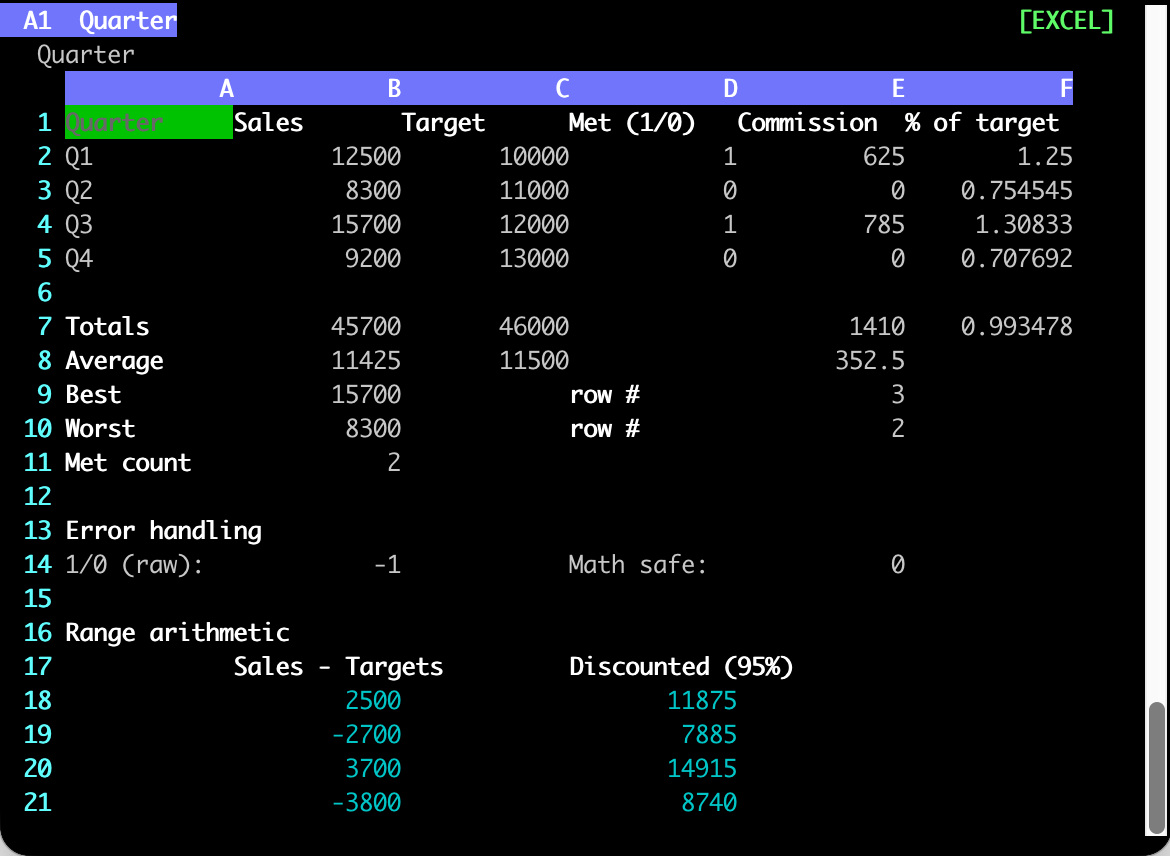
The terminal app over example_excel.json.
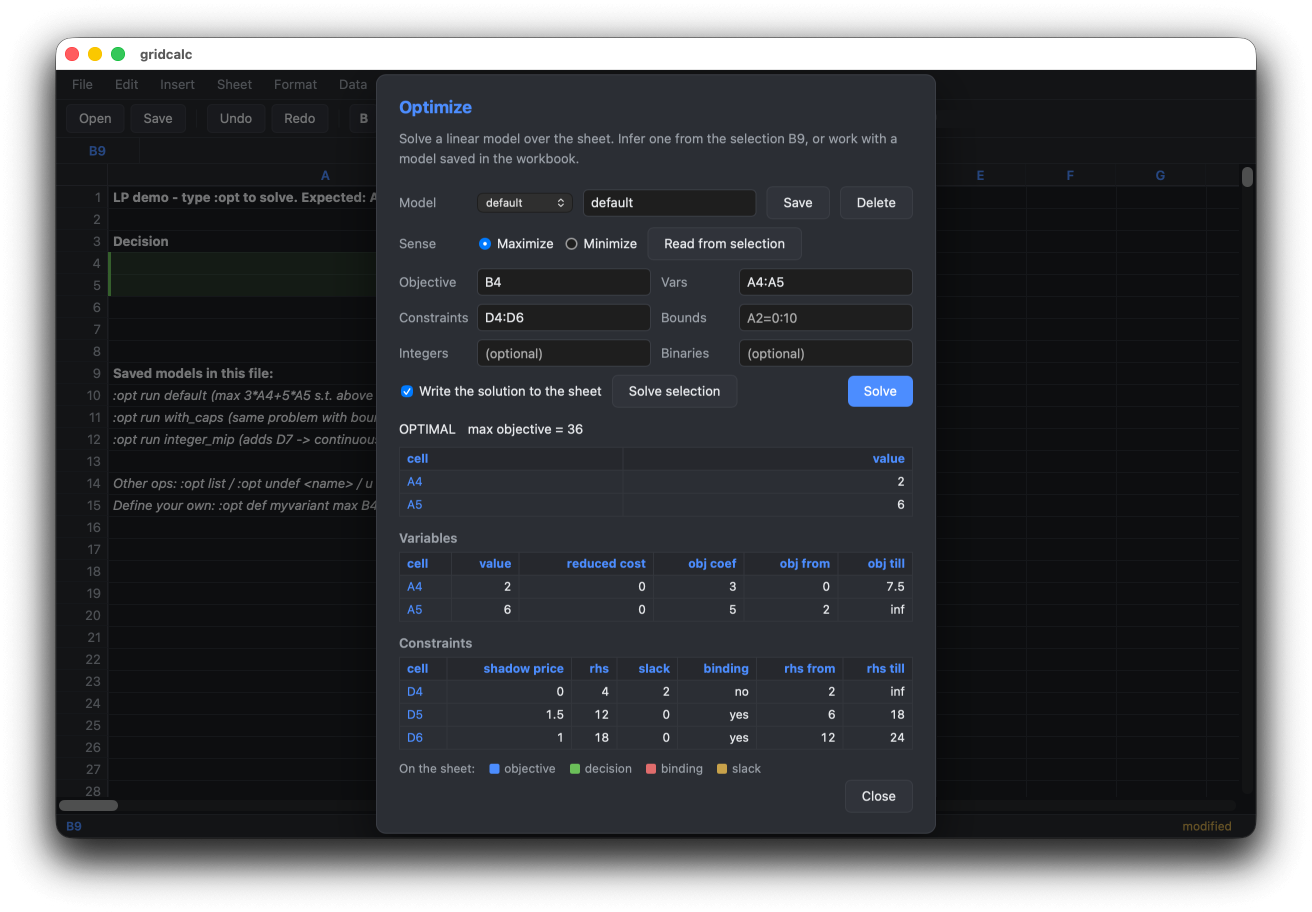
The desktop app solving example_lp.json -- the solution is written to the sheet behind the dialog.
pip install gridcalc
gridcalc budget.json        # terminal
gridcalc-web budget.json    # desktop window  (needs the [web] extra)
Documentation: https://shakfu.github.io/gridcalc/ -- install, tour, formula reference, optimization guide, file format, Python API, and the design notes.
Run an Excel workbook as a function
Give a .xlsx model its inputs by defined name, recalculate, and read its outputs by name. Excel is not needed, and nothing opens a window. examples/example_loan.xlsx is a loan model with inputs Rate, Years and Principal, and outputs Payment, TotalPaid and Schedule (a spill of year and remaining balance):
gridcalc examples/example_loan.xlsx --set Rate=0.04 --set Years=15 --get Payment
{
  "inputs":  {"Rate": 0.04, "Years": 15},
  "outputs": {"Payment": -2219.06},
  "errors":  []
}
Run many cases against one load, from a JSON list of inputs:
echo '[{"Rate": 0.03}, {"Rate": 0.06, "Years": 20}]' > cases.json
gridcalc examples/example_loan.xlsx --inputs cases.json --get Payment --get Schedule#
Or from Python:
from gridcalc.book import Book

book = Book.open("examples/example_loan.xlsx")
book.run({"Rate": 0.04, "Years": 15}, ["Payment"])        # {'Payment': -2219.06}
book.run_many([{"Rate": r / 100} for r in range(1, 10)], ["Payment"])
-
Targets are the workbook's defined names, sheet-local names (
Inputs!Rate), or cells and ranges (Out!B2:D9).Name#reads the whole array a formula spills. -
Values are JSON: numbers, booleans,
null, text, and lists of rows for a range. Text input is never read as a formula. -
Each case starts from the workbook as loaded. A batch writes only the cells that change between cases, so a case costs one incremental recalculation. On an 18,000-formula model that is about 44 ms, or 12 ms of throughput with
workers=4. -
Exit codes:
0means the run worked.2means an output you named holds an error, such as#REF!.1means bad input, such as an unknown name or a value of the wrong shape; it is reported before anything is written. -
Safe by default. A workbook's code (code blocks, PYTHON-mode cells, solver models) runs only once approved: at the trust prompt, or with
--trustheadless. A solver model also runs in a separate process with time and memory limits, no network access, and no file writes outside a private temporary directory. Excel formulas are capped at Excel's length and nesting limits, and a recalculation stops after 30 s. -
--convert out.xlsxsaves the workbook with the inputs written in.
How close to Excel? On 282 workbooks with saved values, gridcalc's result matches the saved value in 79,454 of 79,797 formula cells (99.6%). The workbooks are IronCalc's and pycel's function test suites. They exercise functions at their edges, and gridcalc was fixed against them, so read 99.6% as an upper bound for files it has not seen. What still differs is listed in TODO.md and docs/dev/excel-corpus.md. Not supported: .xls, VBA macros, pivot-table refresh, and external data connections.
Full reference: https://shakfu.github.io/gridcalc/reference/cli/#named-inputs-and-outputs
What it gives you
-
Excel-compatible formulas (
=IF(A1>=B1, A1*0.05, 0)) and arrays (=SUM(A1:A10 * B1:B10)) without leaving the terminal. -
Multi-sheet workbooks with cross-sheet refs (
=Sheet2!A1) and a proper dep graph. -
Three formula modes per file: strict Excel, Excel-plus-
py.*, or full Pythonevalwith numpy/pandas. -
Headless
.xlsxruns ----set/--getby defined name, batches from JSON, a PythonBookAPI (above). -
xlsx interop via OpenXLSX C++ -- read every sheet's formulas + values; export with cached values.
-
Linear, mixed-integer & quadratic programming built in via HiGHS --
:opt max B4 vars A4:A5 st D4:D6solves from cells in the sheet, with shadow prices, infeasibility diagnosis, and RHS sweeps. Models persist in the workbook. -
Optimization models over sheet data, as in SolverStudio -- named ranges and tables become model data for a PuLP, Pyomo or GMPL model, which solves and writes its results back to the sheet. Runs on the built-in HiGHS, or the PuLP, Pyomo and GLPK solvers, in a confined process (guide).
-
Goal-seek --
:goal B10 = 100 by A1adjusts a variable so a formula hits a target value. -
Vim-style command line (
:w,:e,:q,/search,y/p, visual selection, undo), with system-clipboard copy/paste -- yank pushes values as TSV, paste pulls TSV in from other apps. -
A desktop app as well as a terminal one -- the same engine behind a mouse-driven grid with menus, a Ctrl-K command palette, and solver results painted onto the sheet. Most
:commands are a shared registry both frontends dispatch, so they behave identically in each.
Install
pip install gridcalc            # core: zero third-party runtime deps
pip install 'gridcalc[extras]'  # adds numpy, pandas, pygments
pip install 'gridcalc[web]'     # adds the desktop window (gridcalc-web)
pip install 'gridcalc[pulp]'    # runs models under the PuLP library and its solvers
pip install 'gridcalc[pyomo]'   # runs models written with Pyomo
Or with uv: uv tool install 'gridcalc[extras]'.
The core install has zero third-party runtime dependencies on Linux and macOS -- the full Excel function library (465 functions: statistical distributions, financial functions, LINEST/TREND regression, ...) works on stdlib alone. Details in the install guide.
A taste
Cells hold a number, a label (any non-=-prefixed string), or a formula (prefixed with =):
        A          B          C
1  Revenue   Cost       Margin
2  1000      600        =(A2-B2)/A2*100      <- formula
3  1200      700        =(A3-B3)/A3*100
4  Total     =SUM(B2:B3) =AVG(C2:C3)
Press : for the command line -- :w saves, :o opens, :q quits, v selects, u undoes, / searches. The quick tour covers the rest, and the command reference lists every command.
Try the shipped examples:
gridcalc example_excel.json          # sales report, named ranges, IF/MATCH
gridcalc example_excel.xlsx          # the same workbook saved as xlsx
gridcalc example_hybrid.json         # progressive tax via py.* + aggregations
gridcalc example.json                # PYTHON: numpy/pandas, list-comprehensions
gridcalc example_multisheet.json     # 3-sheet budget, cross-sheet formulas
gridcalc example_lp.json             # LP/MIP demo -- type :opt to solve
gridcalc example_goal.json           # goal-seek demo -- :goal B1 = 11 by A1
gridcalc example_crosstab.json      # SolverStudio-style model -- :showmodel, then :solve
gridcalc example_loan.xlsx           # loan model -- run it headless with --set/--get
Scripting it
Any operation flag turns the same command line into a batch run that never opens a window -- so the solver is reachable from cron, a Makefile, or CI:
gridcalc plan.json --solve                       # run the workbook's saved model
gridcalc plan.json --solve --sens                # ... with shadow prices
gridcalc plan.json --sweep 'D5 6:24 9'           # parametric right-hand side
gridcalc book.json --goal 'B10 = 100 by A1'      # goal seek
gridcalc book.json --eval '=SUM(A1:A10)'         # evaluate a formula
gridcalc book.xlsx --set Rate=0.04 --get Payment  # inputs and outputs by name
gridcalc book.xlsx --convert book.json           # format conversion
Results go to stdout as JSON with a documented schema, and the exit code separates "the answer is no" (2 -- infeasible, unbounded, did not converge) from "the job is broken" (1). Nothing is written back unless you pass --apply. Full reference: https://shakfu.github.io/gridcalc/reference/cli/
Documentation
| Topic | |
|---|---|
| Install, extras, source builds | https://shakfu.github.io/gridcalc/install/ |
| Quick tour | https://shakfu.github.io/gridcalc/tour/ |
| Desktop app (web frontend) | https://shakfu.github.io/gridcalc/desktop/ |
| Formulas, functions, named ranges | https://shakfu.github.io/gridcalc/guide/formulas/ |
| Optimization (LP/MIP/QP, sensitivity, sweeps) | https://shakfu.github.io/gridcalc/guide/optimization/ |
| Headless CLI (named inputs/outputs, solve, goal, sweep, eval, convert) | https://shakfu.github.io/gridcalc/reference/cli/ |
| File format | https://shakfu.github.io/gridcalc/reference/file-format/ |
| Python API | https://shakfu.github.io/gridcalc/reference/api/ |
| Design notes (recalc, security, web frontend) | https://shakfu.github.io/gridcalc/topological/ |
The pages are built from docs/ with MkDocs; make docs-serve previews them locally.
Development
make build      # rebuild the C++ extensions (_core, _opt)
make test       # unit tests
make qa         # lint + typecheck + test + format (Python and TypeScript)
make web-build  # compile the desktop app's React client
make docs       # build the documentation site
make wheel      # cpXX-cpXX wheel for current Python
The full target list is in the development guide, and make help prints it.
Prior Art
Terminal spreadsheets:
-
sc-im: A ncurses spreadsheet program for terminal
-
sheets: A terminal based spreadsheet tool
-
rustxl: A fast, keyboard-driven spreadsheet with vim-style navigation and Excel-compatible formulas.
Engines that calculate an xlsx file without Excel. formulas, pycel and GridCraft were measured against gridcalc on 279 workbooks, for agreement with Excel and for named-input runs: docs/dev/comparison.md.
-
formulas (Python):
ExcelModel().loads(f).finish().compile(inputs, outputs)returns a callable over the workbook. Defined names work as inputs and outputs, written'[book.xlsx]'!NAME. -
pycel (Python):
ExcelCompiler.set_valueandevaluatetake cell addresses only. A defined name must be resolved throughexcel.defined_namesfirst. pycel 1.0b30 needs Python 3.11 or older and openpyxl 3.0. -
GridCraft (closed source, Rust): a desktop app and
gridcraft-cli, with a JSON command interface and an MCP server.formulas.evaluatereads a name;cell.setdoes not resolve one and writes the active cell instead. -
IronCalc (Rust): 266 of the 279 corpus workbooks are its tests; pycel's fixtures are the rest. Not run as an engine.
-
xlcalculator and koala (Python): set/evaluate APIs like pycel's. Not tested.
-
SpreadsheetGear, Aspose.Cells and GcExcel (commercial, .NET and Java): headless calculation that resolves
Names["X"]. The caller writes the input/output contract. -
Excel Services (SharePoint) published named cells as parameters of a REST API. The Microsoft Graph Excel API reads and writes named items, but calculates in Excel itself.
-
Coherent Spark (commercial): runs a workbook as a web API, with named ranges as its inputs and outputs.
-
HyperFormula (JavaScript): a headless engine with named expressions. It does not read xlsx files.
-
LibreOffice headless, through the UNO API: opens and recalculates xlsx files, one stateful office process per run.
License
MIT