research-diff
Maps your research from its notes, experiment configs, results and paper, draws which evidence supports and which contradicts each claim of the paper, and shows what each iteration (and each agent) changed. Built for doing research with AI

Descargas y Adopción en la Comunidad
Análisis de Salud e Ingeniería (5 Pilares)
1. Gobernanza y Comunidad50 / 200 ▾
2. Metadatos y Empaquetado PEP200 / 200 ▾
3. Seguridad y Cadena de Suministro200 / 200 ▾
4. Documentación, SEO y Ecosistema155 / 200 ▾
5. Ingeniería, CI y Calidad130 / 200 ▾
Documentación Oficial y Guía de Uso — research-diff
Mostrar documentación original completa (README en inglés) ▾
research-diff
git diff shows you lines. research-diff shows you what your evidence says about your paper.
When you run experiments and write a paper with Claude, and more so with a team of agents each on its own experiments and sections, the paper's claims drift away from its evidence faster than anyone can re-read it. A new run quietly weakens a hypothesis that three claims rely on; one agent's discussion contradicts another agent's results section; a number in the paper no longer matches the results file.
research-diff draws the paper's argument as a graph and keeps it current: which findings and conclusions are supported by which evidence, and above all which evidence contradicts your own claims, including where the paper contradicts itself and where one agent's work contradicts another's. In plain colours: green supports, red contradicts.
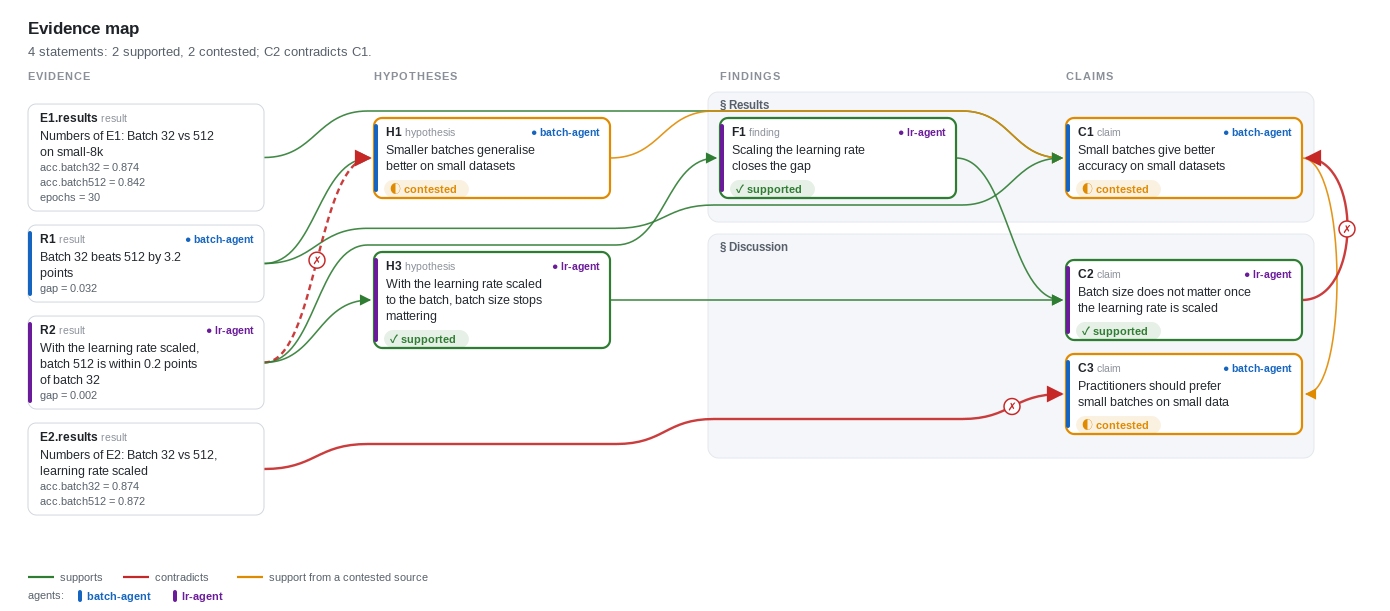
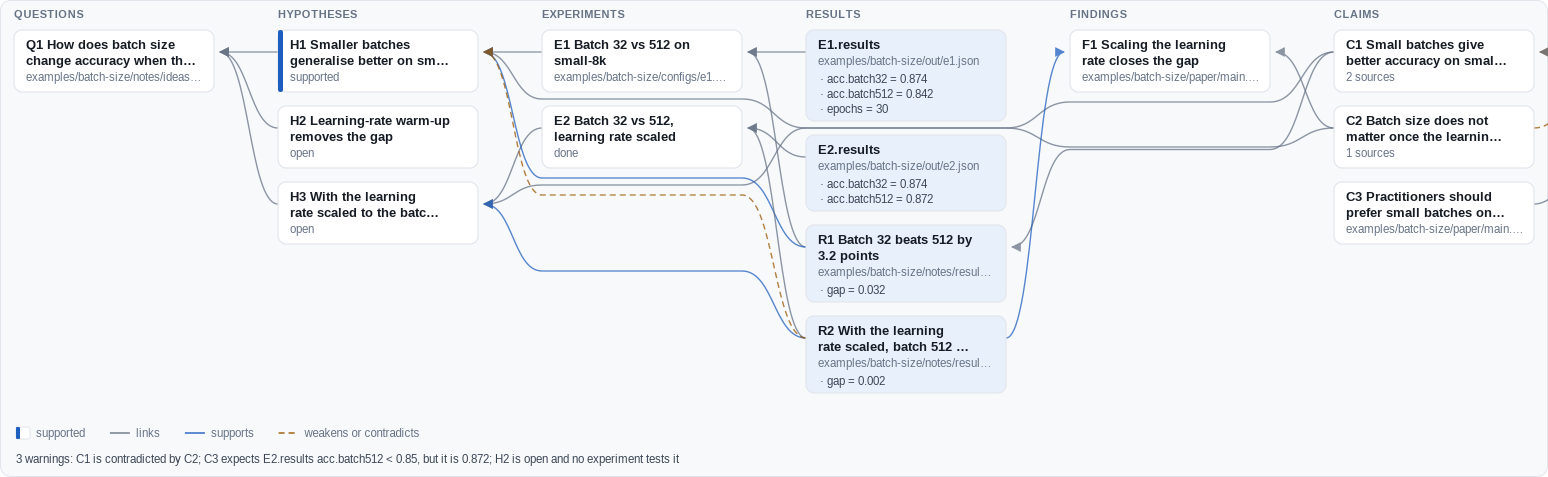
- C1 is contradicted by C2
- C3 expects E2.results acc.batch512 < 0.85, but it is 0.872
- H2 is open and no experiment tests it
- §Abstract:2 says 87.9% (examples/batch-size/paper/main.tex:2), but E1.results acc.batch32 is 0.874, 87.4% at the digits printed
The graph above is this repository's own example (examples/batch-size), regenerated from its files on every change:
two agents, batch-agent and lr-agent; the Discussion's C2 contradicts the Results' C1, C3 expects a number
(batch 512 below 85%) that the experiment E2 does not give, and the abstract still says 87.9% where the results file
says 0.874.
The paper, hand in hand with its results
research-diff reads the paper as you write it (LaTeX or Markdown), not only its markers:
- Sections: every
\section{}(and the abstract) is a band of the graph and a chunk of the outline. - Tables and figures with a
\label{}are evidence nodes (tab:fixed-lr). A% of: E1comment inside the table says which experiment its numbers come from; without one, the result whose numbers it prints is found. A claim whose paragraph\refs a table or a figure is shown by it, and a\refto a label that does not exist is a warning. - Every number the paper prints (with a decimal point or a percent sign) is checked against the results the claim, finding or table rests on, as printed (0.874 or 87.4%, at the decimals shown). A number that matches supports it. A number close to a result but not equal to it is a stale number, a contradiction: "C2 says 86.1%, but E1.results acc.b32 is 0.874". A paragraph with no marker, an abstract restating an old result, is checked against every result and drawn as a red box of its section.
- Your LLM's summary of each section (✦), made in the background the first time a file is opened and kept per version of the file: what the section says, what it claims, and what to watch.
- The review (
research-diff review, or after a turn that changed the paper): your LLM reads the paper against itself and its results, and finds where one section contradicts another, where the text and the numbers disagree, and where a claim says more than its evidence. A finding is kept only if every quote in it is in the paper word for word;--patchwrites the contradictions between marked statements ascontradicted by:links.
research-diff outline paper/main.tex --summarize   # the paper section by section, every number checked, summaries
research-diff review                               # where the paper contradicts itself or its results
Read: the paper, and what stands behind every line
When agents write the experiments and the paper, the person still drives the research, and that takes knowing what
each sentence rests on. The Read tab shows the paper as text (through every \input, the appendix included), with
everything it can trace marked: claims (✓ ◐ ✗), numbers, figures, tables, citations and \refs.
- Hover anything marked: its line lights up and a card says what it is, whether it holds, and where it comes from.
- Click it for the whole chain behind it, each step a click from its source lines:
a number → the result it prints → the experiment → the script that makes it; a figure or table → its file → the
script that writes it; a citation → its
.bibentry; a claim → what supports and what contradicts it; and who changed it, when. A trail takes you back. - What changed since the checkpoint is marked in the margin; Needs attention and Changed since checkpoint
keep only those, and
j/kgo from one to the next. The contents give each section's state. - Say what you think, from any item: Ask Claude (sent to Claude's session with the chain), Tell the agents (on the agents' bus, read before their next step), Rerun (asks Claude to rerun the experiment behind it and update what rests on it), Mark as seen (the checkpoint). None of these is a gate: the work goes on either way.
- The PDF, from each section (PDF ›), at that section's page: built with
pdflatexin the background whenever a paper file changes (kept in .git, never in your folders); it looks on the PATH and where MiKTeX, TeX Live and MacTeX install it, else uses tectonic;RESEARCH_DIFF_PDFLATEXnames it exactly,RESEARCH_DIFF_PDF=offturns it off.
A number is stale only if it differs at the digits printed (0.595 printed as 0.60 is not). Agents see the same
picture through the MCP tools needs_attention, read_item and what_changed_in_paper.
The evidence graph
Left to right: evidence (results, tracker runs, an experiment's numbers, optionally citations), hypotheses, findings, claims, the paper's statements in a band per paper section. Every statement gets a verdict:
| Verdict | Means | |
|---|---|---|
| ✓ | supported | evidence for it, none against it |
| ◐ | contested | evidence for it and against it |
| ✗ | contradicted | evidence against it and none for it, or you marked it refuted |
| ○ | no evidence | nothing backs it, or only what has no evidence itself (an ungrounded support) |
A support only counts while its source holds. When a hypothesis is refuted, or a result is itself contradicted, the
support it gave becomes a broken support (dashed red), with why: "C1 relies on H1, which R4 contradicts". So a
contradiction reaches every claim built on what it contradicts. A number a claim expects: supports it while it holds
and contradicts it when it does not.
research-diff evidence --out docs     # evidence.svg (README, appendix, slides), evidence.html (interactive),
                                      # evidence.mmd (Mermaid), evidence.md (a table), evidence.json
research-diff evidence --strict       # exit 1 while a statement is contradicted or contested (for CI)
research-diff show                    # the same, in any terminal; `research-diff show C3` for one claim's chain
research-diff suggest --links         # your LLM proposes supports/contradicts links nobody wrote, as a patch
The interactive page: click a claim and its evidence chain lights up; Only contradictions hides everything else; one agent's work at a time.
What it reads
Markers in your own files, in one grammar: an id (Q question, H hypothesis, E experiment, R result, F
finding, C claim, and a number) and a title, then links and a status on the lines after it.
## H2: Learning-rate warm-up removes the gap      <- notes (Markdown): a heading or a list item
answers: Q1
status: open                                      <- open | supported | refuted | anything you like
by: lr-agent                                      <- who owns it (an agent of a team, or a person)
\section{Discussion}                              % the paper's sections become the graph's bands
% C2: Batch size does not matter once the learning rate is scaled
% relies on: F1, H3
% contradicts: C1                                 <- the paper contradicting itself, said out loud
% expects: E2.results acc.batch512 > 0.86        <- a number it needs; checked on every change
| Where | How |
|---|---|
Notes (.md) |
definitions as above; tests:, of:, supports:, weakens:, contradicts:, relies on:, metrics: acc=0.91, by: |
| The paper (LaTeX, or Markdown) | a comment: % C1: Small batches win with the same lines; the paragraph's \cite{…} become its sources; its \section{} its band |
| Experiment configs (YAML, JSON, TOML) | a research: block: id, title, tests, status, and results: out/e1.json, whose numbers become the result E1.results |
| Scripts and notebooks | a comment: # research-diff: E2 tests H2 |
| Either end of a link | supported by: R1, contradicted by: R4, weakened by: R2 are the same links written on the claim |
The graph is built from markers only, so the same files always give the same graph. It warns when a claim relies on
nothing or on a refuted hypothesis, when a number no longer meets what a claim expects:, when an open hypothesis has
no experiment, and when a link points at nothing.
Install and run
Three steps, in a terminal (Python 3.11+).
1. Install (on Windows, quit Claude Code first: it keeps the programs open):
python -m pip install -U "research-diff[mcp,app]"
research-diff runs inside system-diff's page and engine (one page, one port, for both), and uses it as a library, so
system-diff always comes along; [app] adds the Studio's Claude Code sessions (it is system-diff's [app], the same
whichever package you name it on). Both are pure Python. system-diff never needs research-diff.
2. Give Claude Code the tools (once; every session in every repository then has them):
claude mcp add --scope user research-diff -- research-diff mcp
claude mcp add --scope user system-diff -- system-diff mcp
Sessions started in the Studio get research-diff's tools on their own, in repositories with research; this step is
for Claude Code in a terminal. Ask Claude "what contradicts the paper?" or "does C3 still hold?" and it answers from them (research_evidence,
explain, paper_outline, review_paper, research_diff, ...).
3. Open the page in your research repository:
cd path/to/your/research-repo
system-diff watch          # or research-diff watch: the same page
Or the Studio, every project and a Claude Code session beside it in one window:
system-diff app --open # or research-diff app --open
Open the address it prints (http://localhost:8765/). A research repository opens on research-diff's tabs, all about
the research: Read (the paper, every claim, number, figure and citation a click from what stands behind it), Now
(what changed since your checkpoint), Evidence, Review (what to fix, worst first), Agents (the research team and its
workflow), Auto-research and History. system-diff's own tabs, about the software, wait behind System ▸. In
Evidence and Review, a click on a claim, a finding or a result in the notes opens its file at that paragraph. The page follows the files as they change, yours and Claude's. To mark what you have
seen, tell Claude "mark it as seen" (or run research-diff checkpoint): the next diff starts there.
Check the setup any time with research-diff doctor.
The plugins add a pane beside the chat (/system-diff), the status line, and hooks that note what Claude works on:
"this turn" diffs, which agent works where, the agents' bus, history per request, and auto-research handing a
finished iteration to Claude by itself. Without them, those are off; everything else works from the page.
/plugin marketplace add simplifiedmachine/system-diff
/plugin install system-diff
/plugin marketplace add simplifiedmachine/research-diff
/plugin install research-diff
research-diff setup claude wires the hooks, status line, a skill and the MCP server without the pane (--undo takes
them back). /plugin uninstall research-diff and /plugin uninstall system-diff remove the plugins.
On its own, without system-diff (or with RESEARCH_DIFF_STANDALONE=1), research-diff serves its own page
(research-diff watch --standalone) and pane (/research-diff); they read a repository as one study.
python -m pip install -U "research-diff[mcp]" # or: pipx upgrade research-diff
Then update the plugin (/plugin, research-diff, update) and restart Claude Code.
On Windows, use python -m pip (as above), and quit Claude Code first: its MCP server, the web page and the
auto-research runner keep research-diff.exe open, and Windows cannot replace a file in use ("WinError 32 … being
used by another process"). If an upgrade failed that way, stop what still runs it and clear what the failed attempt
left behind (the Ignoring invalid distribution ~esearch-diff warnings), then upgrade again:
Get-Process research-diff -ErrorAction SilentlyContinue | Stop-Process -Force
$sp = python -c "import sysconfig; print(sysconfig.get_paths()['purelib'])"
Remove-Item "$sp\~esearch-diff*", "$sp\~ystem-diff*" -Recurse -Force -ErrorAction SilentlyContinue
python -m pip install -U "research-diff[mcp]"
With system-diff: one engine, one page, one pane
With system-diff (0.10 and later, which research-diff installs), research-diff runs inside system-diff's own engine, as its extension: one port, one web page and one pane in Claude Code, with system-diff's caching and diagrams. Its tabs are research's own, even where they share a name with system-diff's:
| Tab | Key | What |
|---|---|---|
| Read | p |
the paper as text, its claims, numbers, figures, tables and citations marked: hover for what each is, click for the chain behind it (number → result → experiment → script, figure or table → script, citation → .bib), what changed since the checkpoint, Ask Claude, Tell the agents, Rerun, and each section in the PDF (see Read) |
| Now | s |
what changed in the research since your checkpoint, on the research map, what Claude is on, and what is worth a look |
| Evidence | e |
the evidence graph as system-diff's diagram (green supports, red contradicts; hover a box for what supports and contradicts it, what to do about it and where it is; Enter or a click zooms into its evidence chain), the statements worst first |
| Review | v |
what to fix before trusting the paper, worst first: the paper contradicting itself, numbers out of date, claims whose support no longer holds, agents contradicting each other, claims nothing backs; Claude's review of the paper; exactly what changed since your checkpoint |
| Agents | g |
the research team: who owns which claims, experiments and sections (lit on the evidence diagram), the workflow (auto-research's runs on it too, and ready-made research workflows to start from), what the agents told each other, the agents worth keeping |
| Auto-research | u |
servers, the campaign, its iterations and their logs |
| History | y |
how the research got here: each commit of the study's files (and each turn), newest first, and what it did to the claims |
Where research is the repository's main work (a research-diff.toml at its root, or a LaTeX paper and no software
project at the root), system-diff opens it on Read and folds its own tabs, the software system's, behind System ▸.
home = "system" (or "research") in research-diff.toml says it for good. With a system-diff older than 0.11, which
cannot fold its tabs, research-diff's sit after system-diff's and are named Research, Problems, Team and Timeline
instead, so that no two tabs share a name.
Several papers in one repository (a folder per study, its paper in a git submodule or not) are read study by
study, each with its own ids (every paper has its C1), its own diff and evidence. The studies are in the list on the
left; pick one and every tab follows it (where system-diff's own list of projects already offers them, that one list
picks the study). Each tab's title says which study it shows. Name them in research-diff.toml
(studies = ["tradeoff_reward_model_eval", "behavioral_field"]) or let research-diff find them by what the folders
hold, never by their names: a top-level folder with a paper of its own (a LaTeX file, or what the paper globs name)
and work of its own beside it (code or data). A study reads its own files, those under its name in a shared folder
(results/<study>/…) and those at the repository's top; a submodule's paper is read at the commit the repository
records for it. If the studies it finds are not separate works, Show as one study at the end of the list reads
the repository as one (remembered; Split into N studies brings them back), and studies = false in
research-diff.toml does so for good. Hovering a box of the Evidence diagram says what it is, what supports and what
contradicts it, what to do about it, and where it is.
On a large repository the first look reads every script and config once (a results folder of logs included); a file
that holds no research is remembered by its content and not read again until it changes, so later looks take a
fraction of a second. Every study is then read in the background, the one shown first, so switching to another takes
no time; its row in the list says how far it is ("reading 40% · 160 of 400 files") or what it holds ("ready · ✗ 4
stale numbers · 1 contested", "no claims marked yet"). Editing one study reads that study again, not the others.
research-diff doctor prints, per study, how long each step takes, and how long starting a program takes on your
machine (where security software scans each start, research-diff avoids starting git).
The research is read from the files system-diff's engine already holds in memory, once per version of the working
tree, so the tabs answer in milliseconds. research-diff then starts no web server and no pane of its own (/research-diff
says where its tabs are), and what auto-research asks of Claude goes through system-diff's pane.
RESEARCH_DIFF_STANDALONE=1 keeps research-diff on its own, with its own page and pane.
In Claude Code (with the plugins)
- The pane:
pRead ·nNow ·rReview ·eEvidence ·uAuto-research ·aAgents ·hHistory. Arrows pick a claim (its evidence lights up), Enter zooms into its evidence chain,bgoes back,ffollows Claude./research-diff tuiopens the same in a terminal of its own, andresearch-diff watchin a browser. With system-diff's plugin there too, the two panes take turns beside the chat: opening one closes the other, and a new session opens on the one you called last.- Now: where Claude (or which agent) is working, every statement worst first, and what is worth a look since you last looked, ranked by consequence (the paper contradicting itself first) and each with why it matters.
- Review: everything since your checkpoint, exactly, with a picture of only what changed.
- Evidence: every statement by paper section with what supports it and what contradicts it.
- Read: the paper, its sections' state and what needs attention; in the browser, every marked item opens the chain behind it.
- Agents: the team, what each agent owns, its verdicts, where it contradicts another agent, and the bus.
- History: how the research got here: "You asked: run the LR ablation → it got: R2, H1 supported → contested, 1 new contradiction (C2 contradicts C1)", for the whole study or one claim.
- In the chat: one line when an edit or a run moves a claim's verdict or makes a contradiction, and one at the end of the turn. The status line keeps the count of contradictions in view.
- Ask Claude "does C3 still hold?" or "what contradicts the paper?": it answers from the MCP tools
(
research_evidence,explain,paper_outline,review_paper,research_diff,research_map), with the picture.needs_attention,read_item(an item's chain, by the id the Read tab andneeds_attentiongive) andwhat_changed_in_papergive Claude and every agent the picture you read in the Read tab. Asked from the web page's box, the answer shows on the page, and what Claude names (point_to) lights up in its evidence graph; findings it keeps (note) stay on the node's card. - One address for every project: each web page joins system-diff's registry of running pages, on the first free
port from 8765, so with both tools running every page has a tab per project and per tool, and the first one lists
them all at
/projects/page(research-diff hubprints it). - Objectives: research-diff learns what you keep asking for ("three seeds for every number", "don't claim beyond
the 8k split"), shows it, keeps it in front of Claude and every agent, and marks changes that touch it.
xclears one you disagree with;research-diff objectives add TEXTstates one.
Auto-research
Research is iterations: run, look at what came out, improve, run again. The Auto-research tab (on the web page,
and u in the pane) runs that loop on your servers, while you watch it:
- Servers: add this machine (
local) or SSH hosts your keys already reach (no password is asked or kept), with a working directory, a setup command (source ~/venv/bin/activate) and their GPUs; Check reaches the server and lists its GPUs (nvidia-smi), Use these GPUs keeps them. - Start with a goal, an optional target (
E2.results acc.batch512 > 0.88, asexpects:writes it), an iteration budget, the servers to use, and the first experiments (or none: Claude plans the first iteration). - Each experiment runs its
run:command (besideresults:in its research block, from the repository's root), on a free GPU (CUDA_VISIBLE_DEVICES, one job per GPU), the code copied there with rsync. Its state and the tail of its log are on the page; when it ends, its results file comes back into the repository, so the map, the evidence graph and the paper's number checks move with it. - When an iteration ends, Claude analyses it and improves the experiments (configs, code, the next settings),
then submits the next iteration with its analysis and why (
autoresearch_submit), until the target holds, the budget is spent, or it callsautoresearch_finishwith what was found.
research:
  id: E2
  tests: [H3]
  run: python train.py --config configs/e2.yaml      # what auto-research launches
  results: ../out/e2.json                            # what it brings back
Pause launches nothing new (running jobs go on and are collected), Resume goes on, Stop kills the running jobs. It survives a disconnect: the launching, checking and collecting is a runner process of its own, and jobs go on on the servers; when the session comes back, it is told where the loop stands and goes on improving. While the session is open, the pane hands each finished iteration to Claude, and the Stop hook keeps Claude on it.
research-diff auto server add lab me@gpu-box --workdir ~/runs --gpus 0,1,2,3 --setup "source ~/venv/bin/activate"
research-diff auto server check lab
research-diff auto start "Does the gap close with the learning rate scaled?" --target "E2.results acc.batch512 > 0.87" --max 5
research-diff auto status | pause | resume | stop
Teams of agents
For work across the study, Claude plans a team with plan_agents: one agent per paper section, or per hypothesis
(its experiments and their results), or as you say. Each agent gets a brief: what it owns, the evidence its work
relies on (owned by others), the contradictions already open on its nodes, and the rules.
- Each agent claims its nodes (
claim) and writesby: <name>under its markers: the graph colours every box by its agent. - The bus has a topic per node. The hooks publish every change on the topic of the node it touched, as it happens;
a new contradiction goes to the owner of the contradicted node, naming both agents: "CONTRADICTION: R4
contradicts C1 (R4 is lr-agent's, C1 is batch-agent's)". Agents
publishtheir own notes too. - Each agent hears the nodes it owns and everything upstream of them in the evidence graph, and its unread messages reach it with its next tool result (the PostToolUse hook), without waiting on anyone.
- The Agents tab and the graph's across agents list show where one agent's work contradicts another's.
Agents worth keeping. A role that comes back across plans (a results writer, a reviewer, a tester) or keeps
finishing its work is suggested for keeping (saved_agents, the Agents tab), and Claude saves it as a Claude Code
subagent (save_agent: .claude/agents/<name>.md, shared through git), so later sessions and teams start it by
name, and a new plan reuses it when a role matches.
research-diff agents plan "write the batch-size paper"     # the same from a terminal: the briefs
research-diff agents                                       # the team and the bus
Use without Claude Code
research-diff map --out docs            # research.svg and research.json: the whole map
research-diff diff --base HEAD          # what your uncommitted iteration did (--narrate: in plain words, by your LLM)
research-diff sync                      # MLflow / W&B runs into research/runs.json
research-diff checkpoint                # mark what you have understood
research-diff diff                      # only what came after that (--base turn: this turn of your agent)
research-diff history --commits 50      # the research's history, from git too: one plain sentence a step
research-diff history compare A B       # what changed between two points (history entries or git refs)
research-diff readme                    # keep the README's evidence graph and map current (--check in CI)
research-diff doctor                    # why it is quiet, slow or wrong here
A diff reads like: 1 new contradiction (C1 relies on H1, which is refuted); C1: no evidence → contradicted; adds 1
hypothesis (H3); H1: open → refuted; E1.results acc.b32: 0.874 → 0.881 (+0.8%); 1 new link. It comes with the exact
list (plan.txt) and a picture of only what changed (diff.svg).
Pull requests: every pull request gets its research diff and the evidence table as a comment, with the evidence
graph in Mermaid, which GitHub draws (.github/workflows/research-diff.yml, which you can copy;
research-diff comment writes the comment).
Experiment trackers
Runs logged to MLflow (its local mlruns/ store) or W&B (its local wandb/ folders) become results of the experiment
they are tagged with: research-diff.experiment (or research_id) as an MLflow tag or param, research_id in the W&B
config. Tracker folders are usually git-ignored, so research-diff sync copies their runs into research/runs.json,
which is tracked: the runs are then on the map, in git and in the next diff. The hooks, the live page and the MCP tools
sync on their own.
Markers suggested by your LLM
research-diff suggest                 # notes and paper files with no marker yet, or name the files
git apply .git/research-diff/suggest.patch
research-diff suggest --links         # supports / contradicts / weakens links between the nodes you have
git apply .git/research-diff/links.patch
Your LLM (the one your Claude Code uses) proposes markers for what the text already says, and links (above all the contradictions) that the text and the numbers show. Each proposal is checked before it reaches the patch: a real line of a file it was shown, a marker in that file's own form, ids that exist (or, for a new marker, are not used yet), a link not already written. Nothing is written until you apply the patch.
Privacy
Everything stays on your machine, under .git/research-diff/: never committed, never sent anywhere. The only exception
is the optional LLM features (objectives, suggest, --narrate), which send your requests or the text of the files
you name to the LLM your own Claude Code already uses. RESEARCH_DIFF_LLM=off turns them off;
RESEARCH_DIFF_WEB=off keeps the hooks from starting the web page.
| Setting | What it does |
|---|---|
RESEARCH_DIFF_STANDALONE=1 |
run on its own (own page and pane) even with system-diff installed |
RESEARCH_DIFF_LLM=off |
no LLM at all (summaries, review, objectives, suggest, narrate) |
RESEARCH_DIFF_WEB=off |
the hooks start no web page |
RESEARCH_DIFF_HOOK_SYNC=1 |
the hooks do their reading themselves instead of in a background worker (slower; for debugging) |
The pictures, git reading and LLM discovery are system-diff's; the pane is system-diff's pane, showing the research.
License
MIT